Help & Support
Frequently Asked Questions
Answers to the questions we hear most — about building research apps with wearables, and about the Heel2Toe gait sensor. Can’t find what you need? Email support@physiobiometrics.com.
Wearables & research apps
Building a study or trial that collects data from a smartwatch or fitness band? Device connectivity, operating-system requirements, phoneless sync, and participant-eligibility all have moving parts — we keep the full, current breakdown in one reference.
Which watch, which phones qualify, and how the data reaches your data set:
Heel2Toe gait sensor
Buying, using, and getting support for the Heel2Toe sensor and the Docking Station app.
Buying Heel2Toe
Do I need one device or two — one for each foot?
You only need one Heel2Toe device. It works on either foot — wear it on whichever foot you want to retrain. A second device isn’t required and won’t improve results.
Where can I buy Heel2Toe? Is there a store near me?
Do I need a prescription to buy Heel2Toe?
No — no prescription is required. Heel2Toe is a Class I medical device and can be purchased directly, though if you are recovering from a specific condition or injury we suggest discussing its use with your physiotherapist or physician.
Do you have any discount codes or promotions?
We don’t run regular promotions or discount codes — the price shown is the price you pay. For clinic, institutional or research orders, email
sales@physiobiometrics.com about quantity pricing.
Do you ship internationally?
Yes — we ship to 29 countries, including the United States, the United Kingdom, Ireland, most of Western Europe, Australia, New Zealand, Japan, South Korea, Singapore, Israel and the United Arab Emirates. Select your country at checkout to see prices in your local currency and the shipping rates available to you. If your country is not listed, email
sales@physiobiometrics.com and we can add it. International shipments need a contact phone number for the carrier.
Will I have to pay customs duties or import taxes?
Orders ship from Canada and we don’t collect duties or import taxes at checkout. Depending on your country, customs duties, import taxes or a carrier brokerage fee may be charged on delivery — these are set by your government, not by us.
Do you offer free shipping?
No — shipping is charged separately and calculated at checkout based on your destination.
Do you offer express or expedited shipping?
We don’t offer an express option — all orders ship by our standard service. Most of the overall timeline is preparing the device before dispatch, so a faster carrier wouldn’t meaningfully shorten the wait.
How is the device powered? Will it work with my country’s outlets?
The sensor is battery-powered and recharges over a USB-C cable. Any standard USB-C charger or computer port works worldwide — no voltage or plug-adapter concerns.
How does the device work, and what does the beep do?
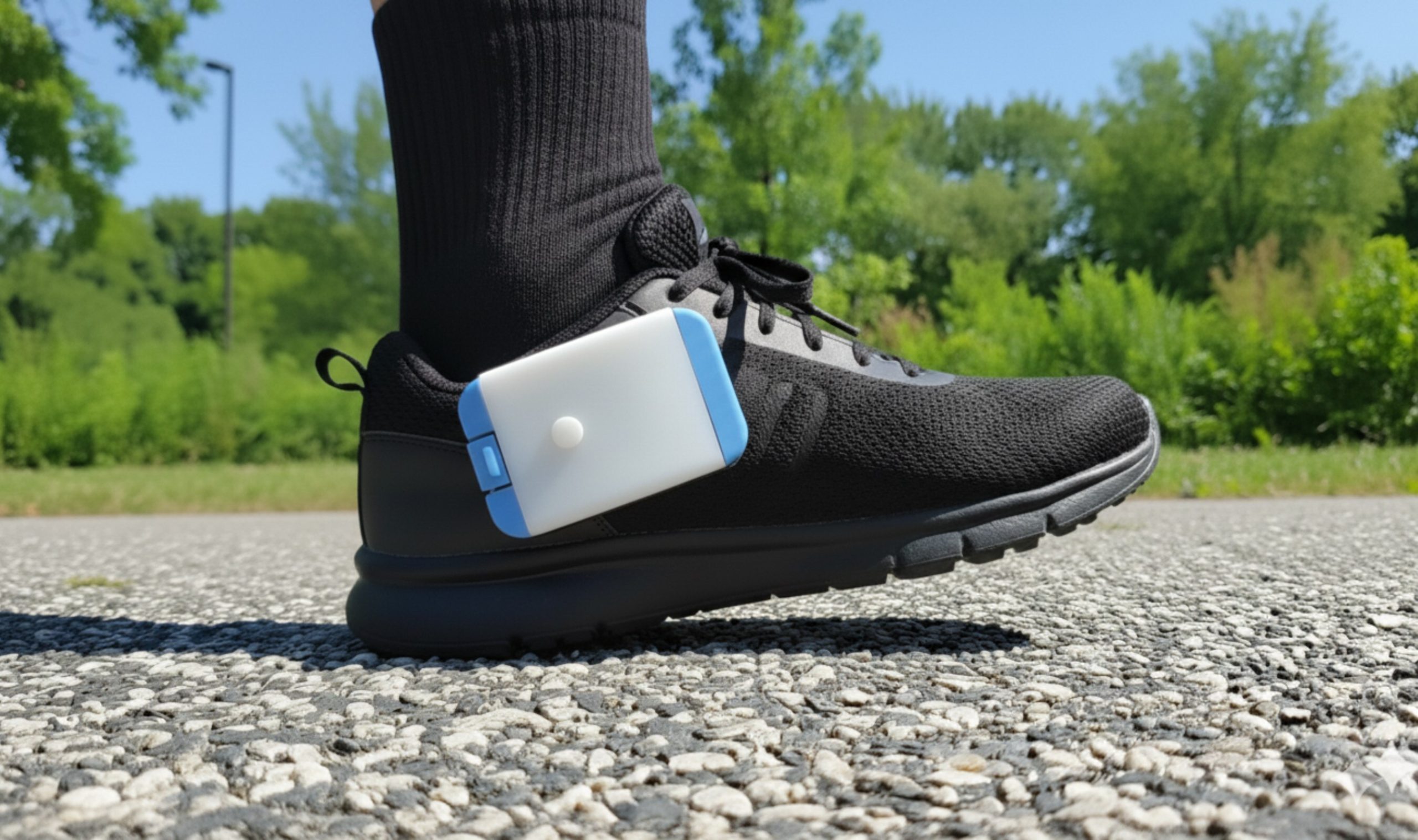
Heel2Toe is a clip-on shoe sensor that gives a real-time beep when your heel strike is correct, helping retrain your gait. After a walk, plug it into a computer running the Docking Station app to view your session statistics.
Is Heel2Toe registered with Health Canada?
PhysioBiometrics holds Health Canada Medical Device Establishment Licence (MDEL) #18577, and Heel2Toe is a Class I medical device. We also hold a Health Canada Certificate to Export, issued in August 2025.
Is there published research behind Heel2Toe?
Yes. A randomized pilot trial published in Pilot and Feasibility Studies (2024) reported that 13 of 14 Heel2Toe users improved their Six-Minute Walk Test distance by a mean of 66.4 metres, while the 7-person control group declined. These are findings from one published study and not a prediction of any individual’s result.
Is the Docking Station app free?
My payment was rejected — what now?
Try PayPal (an instalment option is available in some countries), or email
sales@physiobiometrics.com for an Interac e-Transfer or wire option. If a retry ever results in a duplicate charge, email us right away and we’ll cancel the duplicate before fulfilling.
I received a suspicious email about my order or domain — is it real?
Treat unexpected “store restriction” or “domain renewal” emails as phishing. Legitimate notices come from official Shopify or your domain registrar’s addresses. Forward anything you’re unsure about to
support@physiobiometrics.com for a second look.
Clinical, research & partnerships
We want to use Heel2Toe in a clinical study — how do we order?
Email
support@physiobiometrics.com with your institution, lead investigator, number of sensors, shipping address, and currency. We’ll send a quote, invoice on your institution’s terms, and include free Docking Station onboarding (a short call once your sensors arrive).
We’d like to distribute or partner with you.
We’re open to international distribution partnerships. Email
sales@physiobiometrics.com with your company, market, and regulatory credentials.
Can my clinic or research institution buy in bulk on an invoice?
Yes. Email
sales@physiobiometrics.com with quantity, shipping address, and currency. We routinely invoice institutions in USD and can omit GST/PST where applicable.
Shipping & delivery
When will I receive my order?
We process and pack orders within 3–5 business days. Delivery within Canada is typically 3–7 business days after that; international is 7–20 business days depending on destination and customs.
My tracking hasn’t updated / shows the package still in Montréal.
Carrier hand-off between Canada Post and a local carrier can take a few days to show. If tracking hasn’t moved for over a week, email
sales@physiobiometrics.com with your order number and we’ll investigate or reship.
My package was returned to sender, or the address was wrong.
It says delivered, but I can’t find it (condo / common area).
Email
support@physiobiometrics.com with your order number. We can provide the delivery date/time and the carrier’s delivery-scan details that building administrators usually need to investigate.
Is delivery affected by postal disruptions?
During postal disruptions we switch to an alternate carrier. Expect a short delay and, occasionally, a shipping-cost adjustment — which we’ll confirm by email before shipping.
Returns & refunds
What’s the return policy?
A 30-day return policy. Return shipping is the customer’s responsibility, and the refund is processed 2–3 business days after we receive the returned sensor (minus return shipping if we issued the label).
How do I return my Heel2Toe?
Email
support@physiobiometrics.com first to request a Return Authorization (RMA) number. We’ll send a return label and address. Please don’t ship anything before you have the RMA — unauthorized returns may be refused.
I returned the sensor but haven’t received my refund.
Refunds post to your original payment method 2–3 business days after we receive the sensor, and your card issuer may take another 3–7 days to show the credit. If it’s been more than 10 days since we confirmed receipt, email
sales@physiobiometrics.com and we’ll verify.
My device seems defective — how do I get a replacement?
Email
support@physiobiometrics.com with your order number, a short photo or video of the issue, and the device serial number (on the device, or in the Docking Station app under
Settings → Select the SD Card). We’ll diagnose and either ship a replacement or process a refund.
Using the sensor
Prefer to watch? Step-by-step video tutorials
Using your Heel2Toe
Extracting your walking sessions
Docking Station Clinic Mode
What is the SD card for?
The SD card inside the sensor stores your walk-session data (steps, beep events, gait metrics). When you connect the sensor to the Docking Station app, it reads the card and uploads the sessions. You don’t need to remove it — leave it in the sensor.
What do the lights on my Heel2Toe mean?
While you walk, green means all good on the right foot and orange all good on the left; blue means the beep is switched off, purple means not calibrated, yellow means the battery is low and red critically low. The full
Heel2Toe™ light (LED) guide covers charging, calibration and docking too.
The sensor doesn’t beep, or I have to press very hard to trigger it.
The sensor calibrates to your normal heel strike. If it needs unusually heavy impact, run the calibration routine again (a short ~30-second walk in calibration mode). If the beep is still inconsistent afterwards, email
support@physiobiometrics.com — it can indicate a clip-alignment issue.
What does the button do — how do I wake, sleep, or reset the sensor?
Wake it up: press and hold the button until the LED flashes red-green-blue with beeps (up to 10 seconds).
Put it to sleep: press and hold until the LED flashes yellow three times (up to 10 seconds).
Reset it — for example if it beeps continuously — by holding the button for about 10 seconds until it stops. If it won’t wake or reset, email
support@physiobiometrics.com.
How long does the battery last, and how do I charge it?
A full charge takes about
3 hours and gives roughly
60–90 minutes of continuous use. If it isn’t lasting: try a different charging cable, make sure the cable is firmly seated, and check that your outlet or power bar is supplying power. Still short? Email
support@physiobiometrics.com.
Calibration trouble — no three beeps, or a long continuous beep?
Power the sensor off and on to reset it, then re-run calibration. If a long continuous beep keeps recurring, email
support@physiobiometrics.com — we’ll help or send a replacement. And if the sensor beeps
too often while you walk, raise the step threshold to the level your walking specialist recommended.
Can the beep play through a hearing aid or Bluetooth headphones?
Not on the current generation — the beep plays through the on-device speaker only. We’ve heard this request (for quiet clinics and hearing-impaired users) and it’s on our roadmap.
Docking Station app
What cable do I need to connect the sensor to the Docking Station?
The Heel2Toe uses USB-C. Crucially, you must connect it with a USB-C data cable — not a charge-only cable. Many inexpensive USB-C cables carry power but no data, and the Docking Station will not detect the sensor with one of those. This applies on Windows, macOS, Android, and iPhone/iPad alike. If the app doesn’t see your sensor, swap in a known data cable first — and the video tutorials above walk through extraction on each platform.
Which operating systems are supported?
Windows 10 / 11 and
macOS 13 (Ventura) and newer are supported (older macOS is not). An
iOS / iPadOS version is in TestFlight beta — request an invite from
support@physiobiometrics.com (needs a USB-C data cable). Android isn’t supported yet.
Windows says “Unable to write files to folder.”
This is a permissions issue. Try: (1) right-click the app →
Run as administrator; (2) install under your user folder (e.g.
C:\Users\you\Heel2Toe) rather than
Program Files; or (3) allow the app in Windows Security’s Ransomware / Controlled Folder Access. Still stuck? Email
support@physiobiometrics.com with a screenshot.
My Mac is on macOS 12 — how do I use the Docking Station?
The macOS app needs macOS 13+. Either update macOS if your Mac supports it, use the iOS/iPadOS TestFlight build on an iPhone or iPad (with a USB-C cable), or use a Windows PC.
I can’t log in, or it says no data is registered.
First, make sure you’re using the same email address as on your order. If a reset doesn’t work, email
support@physiobiometrics.com and we’ll verify and reset your account.